Ez Utility Configuration Software
Why Barcode Scanner Configuration Software Matters
Managing barcode scanners across different devices and deployments can be time-consuming without the right tools. A dedicated configuration utility simplifies setup, firmware management, and advanced data formatting, enabling businesses to deploy scanners faster, maintain consistent settings, and streamline integration across retail, logistics, healthcare, manufacturing, and field service applications.
How Ez Utility Simplifies Device Management
Ez Utility is a Windows- and Android-based configuration software designed for Marson barcode scanners and RFID readers. It supports wired programming on Windows and wireless configuration on Android, providing intuitive device setup, firmware upgrades, advanced data editing, batch configuration barcode generation, and flexible deployment tools that reduce maintenance effort while improving operational efficiency.
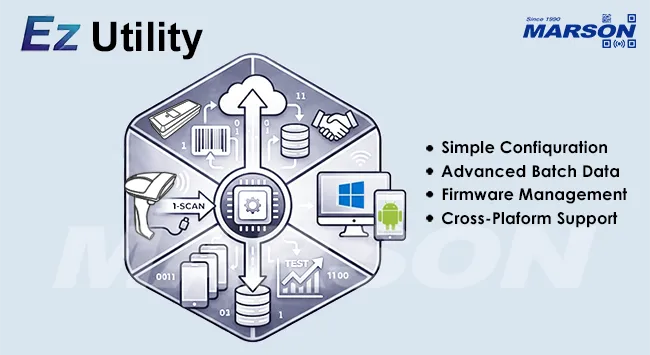
Ez Utility Highlights
- Provides an easy-to-use interface for scanner programming
- Supports wired and quick-pair wireless connections
- Deploys saved settings to multiple or remote devices
- Generates batch configuration barcodes for one-scan offline setup
- Enables advanced data editing for flexible barcode and RFID data formatting
- Supports scanner firmware upgrades with a built-in update tool
- Provides a test window for data verification and bi-directional communication
- Supports multiple character encodings for Android output
- Supports Google Intent API for seamless Android application integration
Features
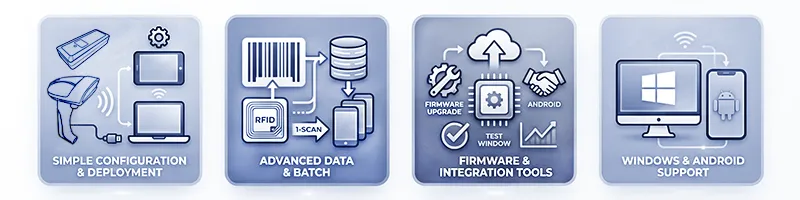
Simple Device Configuration and Deployment
Ez Utility provides an intuitive interface for configuring barcode scanners and RFID readers without complex programming. Windows users can connect devices through a wired interface, while Android users can quickly pair supported wireless scanners. Saved configuration profiles can be reused across multiple devices or deployed remotely, greatly reducing setup time and ensuring consistent device behavior throughout the organization.
Advanced Data Formatting and Batch Configuration
Beyond basic configuration, Ez Utility supports powerful data editing capabilities that enable users to customize barcode and RFID output formats for different applications. It can also generate batch configuration barcodes, allowing multiple scanners to be configured offline with a single scan—ideal for large-scale deployments and field installations.
Firmware Management and Integration Tools
Ez Utility includes built-in firmware update functionality to keep devices running the latest features and performance improvements. A dedicated test window allows users to verify data output and perform bidirectional communication tests, while support for multiple character encodings and Google Intent API helps simplify Android application integration and multilingual data processing.
Windows and Android Support
-
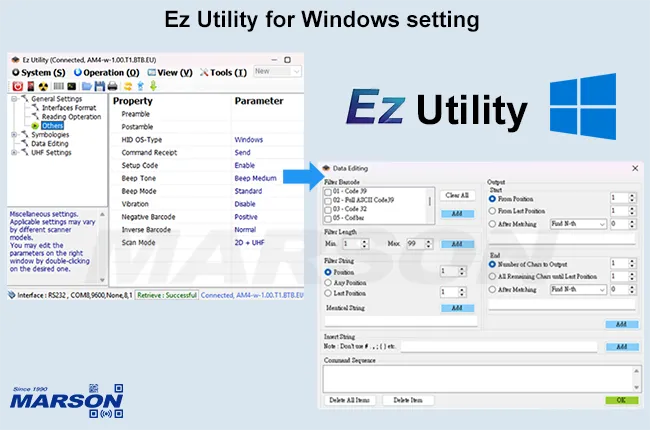
Ez Utility for Windows
Ez Utility for Windows provides powerful configuration and device management tools that simplify large-scale deployment and maintenance. Users can create batch configuration barcodes to configure multiple scanners offline with a single scan, deploy saved configuration profiles to multiple or remote devices, and customize barcode and RFID output through advanced data editing. An integrated firmware update tool also makes it easy to keep scanners up to date with the latest features and performance improvements. -
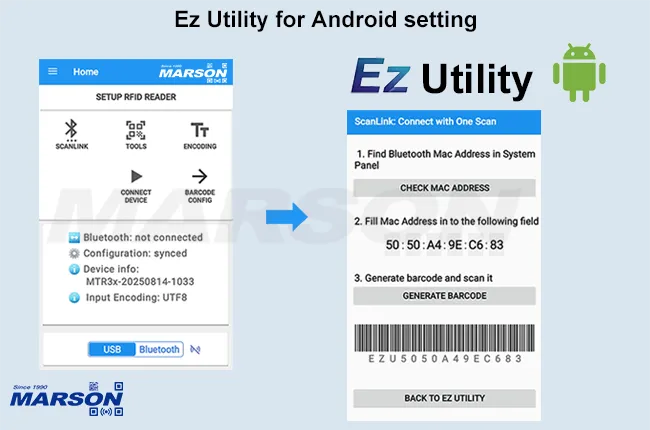
Ez Utility for Android
Ez Utility for Android streamlines wireless scanner configuration and application integration on Android devices. With ScanLink quick pairing, users can connect supported Bluetooth scanners instantly with a single scan. It also functions as a keyboard wedge utility, enabling barcode and RFID data to be output directly into third-party applications such as text editors and web browsers while supporting multiple character encodings for multilingual environments. For advanced integration, Ez Utility supports the Google Intent API, allowing scanned data to be transferred seamlessly into existing Android applications.
Device Support Table
| Product Type | Model | Windows | Android |
| Ez Utility | Ez Utility | ||
| Scan Engine | MT15, MT10, MT780, MT40, MT40W | V | |
| Mobile Computer Scanners | MTB24 | V | V |
| MTR30 | V | ||
| Wearable Scanners | MT588, MT582 | V | V |
| MT500 |
V | ||
| Pocket Scanners | MT851, MT858L, MT828L, MT820 |
V | V |
| MT840, MT850, MT100A, MT110L, MT110 |
V | ||
| Handheld Scanners | MT8158LB, MT8159B | V | V |
| MT8250PE, MT8250P, MT8225, MT3000L, MT8010 | V | ||
| Fixed Mount Scanners | MT6258L, MT6250, MT6220 | V | |
| RFID Readers | MR13, MT859UHF | V | V |
| MR13W, MT8225HF, MT859HF | V | ||
| Pen/Slot Scanners | MT5300, MT52501, MT412(i), MT420(i) | V |
SPECIFICATION
| Connectivity | |
| Interface/Profile | Windows: USB HID / USB VCP / RS232 |
| Android: USB VCP / BT SPP | |
| Compatibility | Windows: XP, 7, 8, 10, 11 |
| Android: 7.0 or later version | |
Mason Technology is a Taiwan-based professional manufacturer and supplier of Barcode Scanners, Scan Engines, RFID Readers and AI Camera of barcode scanner solutins, providing first-class OEM / ODM custom services. Marson products in the automatic identification industry (AIDC) of applications such as Retail, Logistics, Food/Beverage, Semiconductor, HealthCare, Aviation, Field Service, Mobile POS, Access Control and Security. We're scanners delivering options for every purpose and price point.
Product Categories Include OEM Scan Engine, Mobile Computer Scanner, Wearable Scanner, Pocket Scanner, Handheld Scanner, DPM Industrial Scanner, Fixed Mount Scanner, RFID Reader, Pen Slot Reader, AI Camera.